How do I access my CPAP machine data?
Your CPAP machine quietly records a remarkable amount of information every night you wear it — total hours used, your apnea-hypopnea index (AHI), mask leak, pressure delivered, and the timing of every event the machine detects. Knowing how to view that data puts you in the driver's seat of your own therapy. The good news is that every major brand sold in Australia offers at least three different ways to access your data, ranging from a quick glance at last night's summary on your phone, through to breath-by-breath analysis on a computer. This guide walks through all three methods across the four brands we stock at CPAP Club: ResMed, Fisher & Paykel, Philips Respironics and Löwenstein Medical.
Method 1: Cellular auto-upload to the manufacturer's online service
The easiest method is also the most hands-off. Most modern CPAP machines sold in Australia include a built-in 4G cellular modem (or optional add-on modem) that automatically transmits your therapy data to the manufacturer's cloud platform each morning, usually within a few hours of you stopping treatment. You then view your results in a free patient app on your phone, or via a web browser — no SD card, no Bluetooth pairing, no manual sync required.
ResMed — myAir
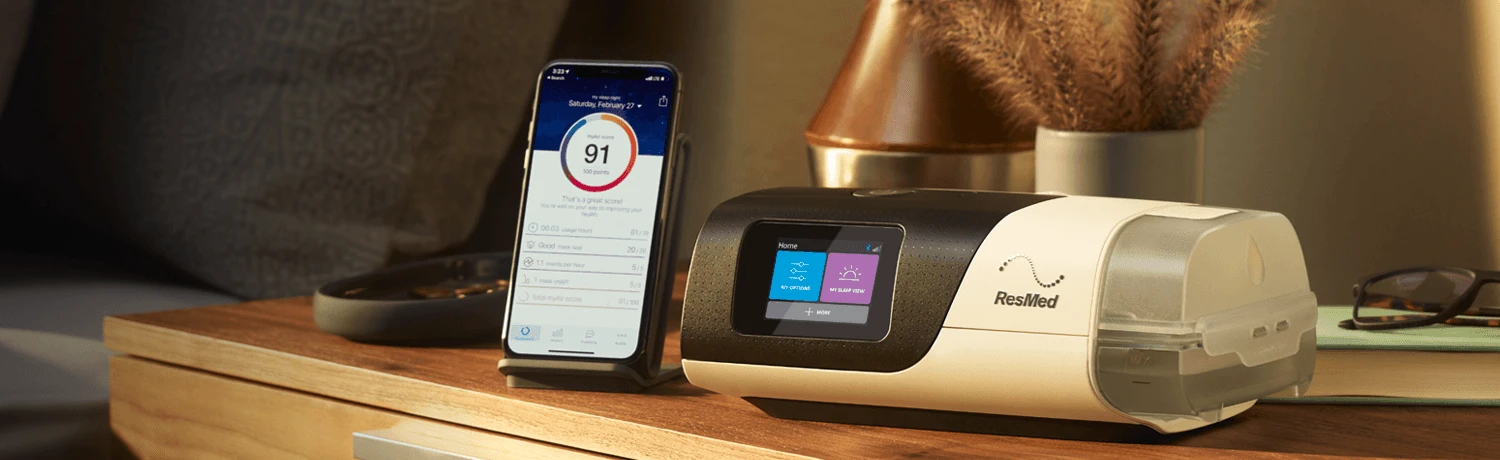
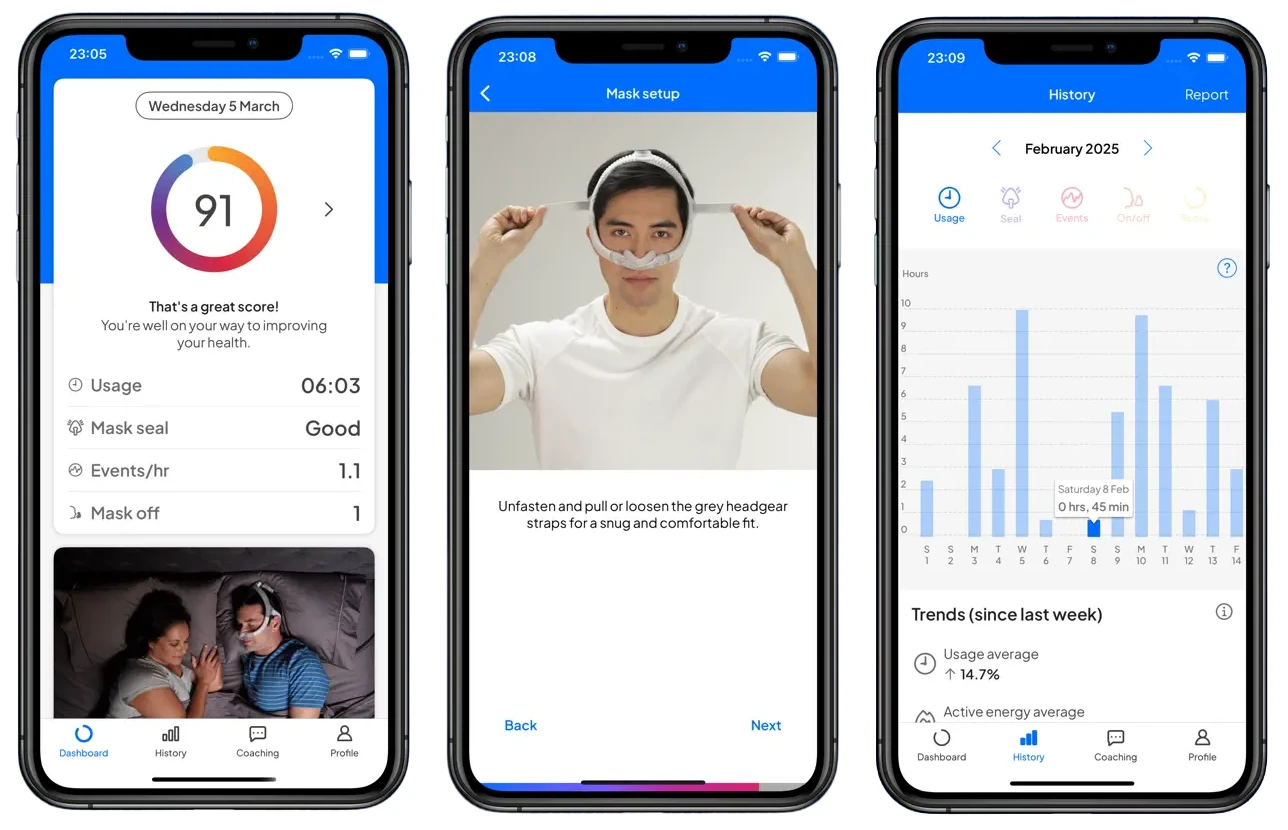
ResMed AirSense 10 and AirSense 11 machines with built-in cellular connectivity upload your data automatically to myAir, ResMed's free patient app. After you create an account at myair.resmed.com and pair your machine (using its serial number and device number), each morning you'll see your nightly myAir score, total usage hours, mask seal score, AHI, and events per hour. Data syncs to both the iPhone/Android app and the browser version.
Fisher & Paykel — SleepStyle App and Web
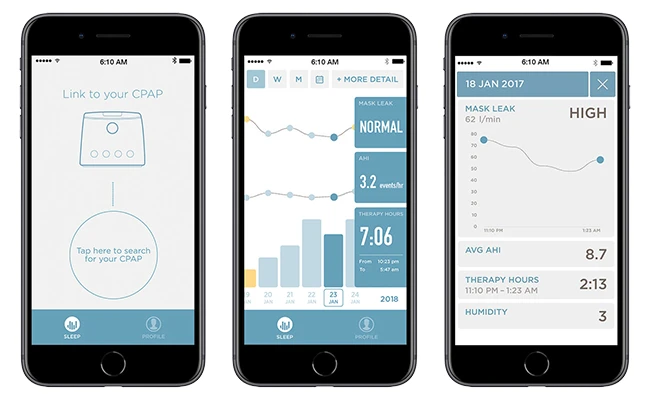
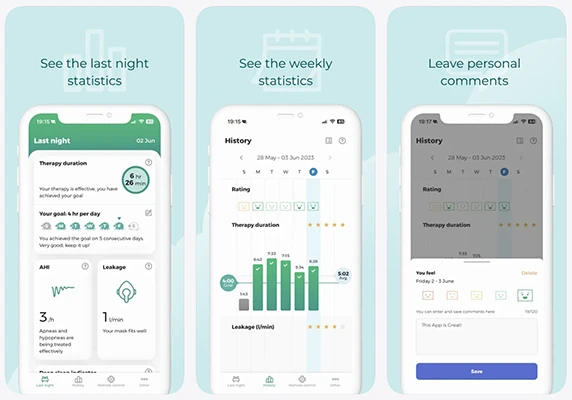
The Fisher & Paykel SleepStyle+ Auto includes a built-in 4G cellular modem that transmits data automatically to the SleepStyle App (iOS and Android) and the SleepStyle web platform. You'll see therapy hours, AHI, mask leak figures, and trend comparisons over time. Your clinician can also access detailed data through F&P's clinician portal, F&P InfoSmart Web.
Philips Respironics — DreamMapper
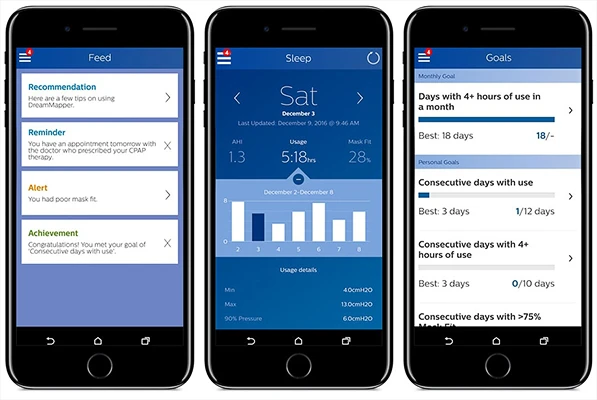
The Philips DreamStation Auto with the cellular modem add-on uploads data automatically to the DreamMapper app and the DreamMapper website. DreamMapper shows therapy usage, mask fit and AHI, plus video guides and personalised goal tracking. Your homecare provider can also receive your data through Philips' clinician software, CareOrchestrator, if you choose to link the two.
Löwenstein Medical — prisma APP
The Löwenstein Prisma 20A and Prisma SMART Max include a built-in 4G modem that transmits data automatically to prismaCLOUD (your clinician's platform) and the prisma APP (your patient app). The prisma APP displays compliance metrics, therapy hours, leak data and the Prisma RECOVER deep-sleep indicator — high-resolution data for 14 days plus summary statistics for up to 365 days.
One quick note about cellular uploads in Australia: cellular connectivity depends on network availability at your location. If you're rural, off-grid, or your modem can't reach a tower, you'll need to fall back to Bluetooth sync or SD card — both covered below.
Method 2: Bluetooth sync to your manufacturer's app
If your CPAP machine doesn't have a cellular modem (or cellular coverage is patchy at your home), almost every modern machine includes Bluetooth as a backup. The patient apps for all four brands accept Bluetooth uploads — you simply open the app on your phone, the app pairs with the machine over a short distance, and the previous night's data transfers across in seconds.
Bluetooth sync uses the same patient apps as Method 1 — just with a different transport mechanism. Practically speaking:
- ResMed: myAir supports Bluetooth pairing with AirSense 10 and AirSense 11 machines for direct phone-to-machine sync. Open the app each morning and it will pull last night's data.
- Fisher & Paykel: The SleepStyle App pairs with the SleepStyle+ Auto over Bluetooth. After initial setup, the app pulls data each time you open it within Bluetooth range.
- Philips Respironics: The DreamMapper app pairs with the DreamStation over Bluetooth (this is the most common method for DreamStation users since the cellular modem is a separate add-on).
- Löwenstein: The prisma APP pairs with all Prisma SMART and SOFT devices over Bluetooth. On the Prisma SMART/SOFT Plus variants (which have Bluetooth only, no 4G), Bluetooth is the only way to view data in the app.
Bluetooth has one obvious limitation: you need to be in the same room as your machine, with the app open, for the sync to happen. It's not as fully automatic as cellular, but it works reliably without depending on mobile coverage or a Wi-Fi network.
Method 3: SD card — taking deeper data into your own hands
Both Methods 1 and 2 deliver a summary of your therapy: total hours, AHI, mask leak, a daily score. That's enough for most users on most nights — but it's only a fraction of what your CPAP machine actually records. If your machine has been writing to an SD card all night (most do, by default), that card holds the full detail: every breath, every flow limitation, every pressure adjustment, second by second.
The SD card lives in a small slot on the side or rear of your machine. On the ResMed AirSense 10 it's on the right side; on the AirSense 11 the slot exists but no SD card is included in the box (you'll need to add a FAT32-formatted card, 32 GB or smaller). The Philips DreamStation slot is on the side. The Fisher & Paykel SleepStyle uses an "InfoUSB" stick rather than an SD card, but the principle is identical. Löwenstein Prisma devices use a standard SD card.
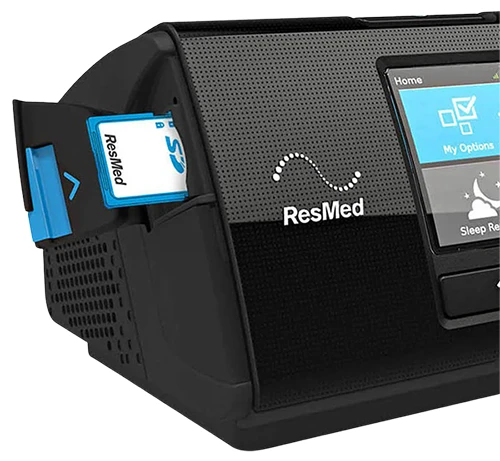
Once you remove the card (always with the machine powered off), there are three main ways to read what's on it.
Take it to your sleep clinician
Your sleep specialist or CPAP clinic uses clinical software — ResMed's AirView, F&P's InfoSmart Web, Philips' CareOrchestrator, or Löwenstein's prismaTS — that reads the full detail off the card. If you've got concerns about how your therapy is going (persistent leaks, daytime tiredness, unusual events), handing your card over at a follow-up appointment is the simplest way to get a professional read on what's actually happening overnight.
OSCAR — free desktop software
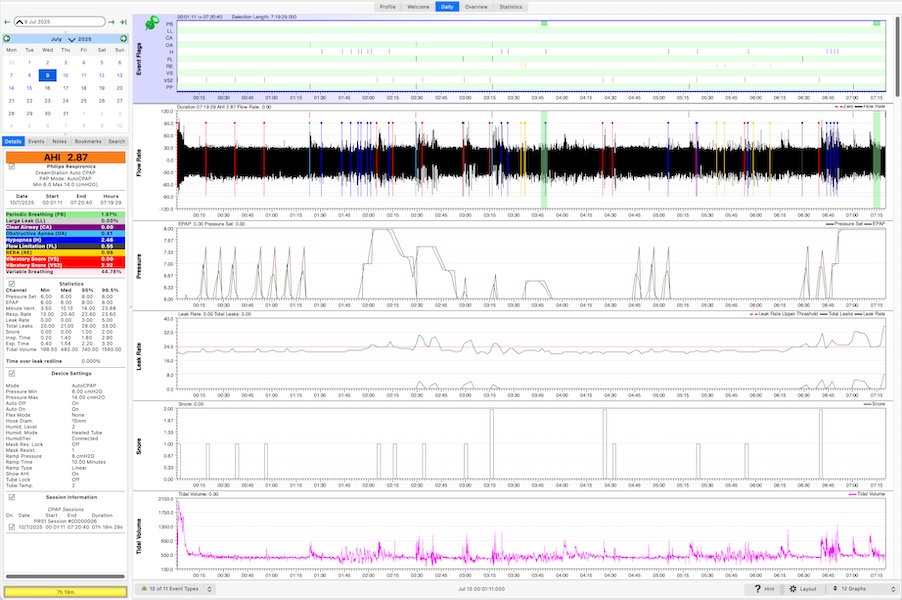
OSCAR (Open Source CPAP Analysis Reporter) is free software that runs on Windows, Mac and Linux. It started life as SleepyHead, written by an Australian software developer with sleep apnea who wanted to see his own data. You download OSCAR from sleepfiles.com/OSCAR, install it on your computer, insert your CPAP SD card via a card reader, and OSCAR imports every night's data — laying out each breath as a chart you can zoom into second by second.
OSCAR supports ResMed (S9, AirSense 10, AirSense 11), Philips Respironics (DreamStation, DreamStation 2), Fisher & Paykel (SleepStyle), and Löwenstein (Prisma SMART). It's the same data the manufacturer's app summarises into a score, but rendered as graphs that let you investigate what's really going on. There's no account, no subscription, and your data never leaves your computer.
SleepHQ — web-based reporting
SleepHQ is an Australian-developed online platform that does much the same job as OSCAR, but in your browser. You upload your SD card data to sleephq.com (a free tier is available, with paid tiers for advanced features) and view the same breath-level detail through a polished web dashboard, with optional integrations for Apple Health wearables and the SleepHQ O2 Ring pulse oximeter. SleepHQ supports the same machines as OSCAR — ResMed Series 9, 10 and 11, Philips DreamStation 1 and 2, F&P SleepStyle, and Löwenstein Prisma SMART.
Many Australian users run both: OSCAR as a no-internet-required local tool, SleepHQ for cloud access, community discussion and integration with other health data sources.
Common questions
Which method shows the most detail?
The SD card route via OSCAR or SleepHQ shows the most detail by a wide margin — you'll see every breath, every flow limitation, and the exact pressure delivered at each moment. The manufacturer's patient apps (myAir, SleepStyle, DreamMapper, prisma APP) show summary data: hours, AHI, leak, an overall score. Both are useful for different reasons.
Do I need a cellular-enabled machine to track my data?
No. Cellular is the most convenient option because uploads happen automatically, but Bluetooth and SD card both work just as well — they simply require a little more action on your part. Every machine we stock supports at least two of the three methods.
My data isn't uploading to the app. What should I check?
Start with the basics: confirm Bluetooth is enabled on your phone, the app is up to date, and your machine is powered on. For cellular-enabled machines, check that the modem icon on your machine's display shows a successful connection (the symbol varies between brands — refer to your user guide). If your data is missing from a single night, give it a few hours — most devices upload after you stop treatment, but transmission can be delayed in patchy coverage. If problems persist, removing and re-pairing the Bluetooth connection usually resolves sync issues.
Can my sleep clinician see my data remotely?
Yes, if you've opted in. ResMed's AirView, Philips' CareOrchestrator, F&P's InfoSmart Web and Löwenstein's prismaCLOUD all let your clinician view your data remotely — usually after you provide them with your machine's serial number and your patient app email address. This is particularly useful for follow-up appointments and remote settings adjustments.
Will the SD card work with any machine?
Stick with the SD card supplied with your machine where possible, or replace it with a comparable FAT32-formatted card from a reputable brand (usually 4–32 GB is plenty). The Fisher & Paykel SleepStyle uses an InfoUSB stick rather than an SD card — these are not interchangeable, so make sure you're sourcing the right format for your specific machine.
Which approach should I use?
For most newly diagnosed users, the manufacturer's app via cellular or Bluetooth is the right place to start — it's free, simple, and shows everything you need to see whether therapy is on track. If you're feeling rested and your nightly score is consistently good, that may be all you ever need. If you're struggling with persistent symptoms despite using your machine every night, or you simply want to understand what's happening overnight in fine detail, pulling the SD card and using OSCAR or SleepHQ is the next step — and discussing what you find with your sleep specialist is usually the right follow-up. You can browse our full range of CPAP machines if you're still deciding which device best suits your needs.
If you have questions about which method works for your specific machine, or you need help sourcing a replacement SD card or modem, contact our team — we're happy to help.